

I have watched Tuhin and Ishraq build this for the better part of a year.
I knew what they were building. I saw the delays. I knew about the WordPress.org naming problems — they had to rename the plugin twice before it got approved. I knew about the payment processor situation, the months spent trying to find a Freemius alternative while operating from Bangladesh.
So when they finally shipped Krom Automation last week, I did not just share the announcement and move on. I sat down with it properly. Not as a favour to friends — because I genuinely wanted to see whether it delivers on what they promised.
This review is from a product marketing manager’s perspective. Not a developer’s. What I care about is the use case, the positioning, the onboarding experience, and whether the pricing logic actually holds up when you compare it honestly to what else is out there.
Let’s get into it.
Why Look for Something Different in the First Place?
I have worked with Uncanny Automator, WP Fusion and Zapier across different projects. They all do the job. But if I am being honest, each of them comes with a tax that nobody puts in the marketing copy.
Uncanny Automator’s interface is a list of rules. Fine if you have one or two simple workflows. Gets unwieldy fast when you have ten running in parallel and you need to understand which one fired and why. It is also not cheap- $199 per year for a single site at entry level, with integrations sometimes sold separately as add-ons.
WP Fusion is excellent at one specific thing: syncing WordPress data to a CRM. That is not general automation. The moment you need anything outside that lane (form submissions triggering Slack alerts, course completions sending certificates) it stops being the right tool. And at $297 per year for a single site, you are paying premium pricing for a narrow scope.
Zapier is the one everyone reaches for first. Until a busy month hits, the task count spikes, and you get a bill that does not match what you budgeted. Per-task pricing is a reasonable model until it is not. And there is a detail that starts mattering more the longer you think about it: your workflow logic, your customer data, your API credentials- all sitting on Zapier’s servers. At $240 per year for 750 tasks per month on the professional plan, a single five-step workflow burns through four tasks per run. Run it 200 times in a month and you are already past the base tier on one workflow alone.
So when Tuhin told me they were building something that runs natively inside WordPress, prices flat, and shows you a step-level log of exactly what ran, I was curious enough to sit down with it properly once it shipped.
What Problem Does Krom Automation Actually Solve?
Let me put it simply.
Your WordPress site is not passive. It generates events constantly- users register, orders complete, payments fail, forms get submitted, courses finish. Most sites respond to almost none of this automatically.
Not because site owners do not want automation. Because the tools available either live outside WordPress and charge per execution, or they require developer involvement every time you want something non-standard.
There are three specific pains that Krom Automation targets directly.
The Zapier trap. Per-task billing feels manageable when you are small. Once your site has real traffic, the variable cost of automation becomes a problem. A launch campaign, a busy sales week, a viral post and suddenly your automation bill is unpredictable. Flat-rate licensing turns automation into a fixed line item, which is how it should be budgeted.
The data residency problem nobody talks about. When your automation runs on Zapier or Make, your workflow data, your execution history, your API credentials and customer details all live outside your WordPress install. For most people this is a theoretical concern. For anyone handling membership data, LMS progress, or payment information, it is worth thinking about more carefully.
The developer dependency. Every custom hook, every edge case that does not fit a pre-built integration, means a developer ticket. A sprint. A wait. Krom Automation is built for the person who knows what they want to automate but does not write PHP to do it.
First Impressions: What You Actually See When You Open It
The first thing that matters with any tool is whether the first-run experience sets you up or frustrates you.
The canvas is real. I have seen plenty of tools call themselves “visual builders” when they are really just lists with arrows between them. Krom Automation’s canvas is a genuine drag-and-drop builder. You can see the full flow at once, zoom out for a bird’s eye view, and the auto-layout handles branching without you having to manually reposition every node. It feels closer to Figma than to a spreadsheet.
Finding what you need is fast. The trigger and action library is searchable, and the categories are logical: user events, post events, WooCommerce, forms, LMS, messaging. I found what I was looking for the first time without reading documentation.
The simulator is the feature I wish every tool had. Before any automation goes live, you can run a complete dry-run against real site data. Zero emails sent, zero CRM records updated, zero side effects. You see exactly what would have happened at every step- which merge tags resolved, which conditions passed, which step would have failed and why. For a PMM onboarding a new marketing tool across a client site, this changes the confidence level entirely. You test it properly before real customers are involved.
Execution logs are step-level, not pass/fail. Most tools tell you whether a workflow ran successfully. Krom Automation’s execution logs tell you what data each step received, what it returned, how long each step took, and exactly what error occurred if something failed. That is the difference between debugging in 30 seconds and spending an afternoon guessing.
The Use Cases Worth Actually Paying Attention To
I am not going to list every feature. I want to talk about three workflows that a marketing-led team actually runs and what setting them up felt like.
Use Case 1: The Welcome Sequence That Does Not Embarrass You
Trigger: User Registered Workflow: Wait 10 minutes → Send personalised email using
{{first_name}}→ Create contact in FluentCRM → Tag them in Mailchimp → Post notification in Slack #signups
Most WordPress sites send the bare default welcome email the moment someone registers. It is generic, it is instant, and it reads like a machine wrote it, because a machine did write it, and a different machine delivered it with no delay and no personalisation.
This workflow takes about five minutes to build. The 10-minute delay is intentional- it makes the email feel considered rather than automated. Merge tags like {{first_name}}, {{site.name}} and {{user_email}} pull live data from the registration event into every field, including the email subject line.
Once it is live, you never think about it again.
Use Case 2: The Payment Failure Recovery Sequence
Trigger: Subscription Payment Failed (MemberPress or WooCommerce Subscriptions) Workflow: Send payment failure email with card update link → Wait 3 days → Send second reminder → Wait 4 days → Send final notice → Alert team on Slack
Every membership site loses members to failed payments. Most of those members would have renewed if someone had followed up. Most sites do nothing because building a dunning sequence manually means developer time and a third-party tool.
This is three email steps and a Slack notification, connected with delay nodes and a condition that stops the sequence the moment payment succeeds. Set it once. Run it forever.
The MemberPress integration fires the trigger on failed payment and exposes the member’s name, email, membership tier and the amount due as merge tags- so the recovery email is specific to that person and that payment, not a generic “there was a problem” template.
Use Case 3: Form to CRM Without Middleware
Trigger: Gravity Forms Submission Workflow: Create contact in FluentCRM with all form fields mapped → Append row to Google Sheet → Send auto-reply to submitter → Post lead summary to Slack #leads
This is the one I see agencies build on Zapier every week. The problem is not that Zapier cannot do it — it can. The problem is that every form submission costs tasks, and a busy lead generation campaign doubles your automation bill for the month.
The same workflow in Krom Automation costs nothing extra when the form gets 500 submissions in a day versus 50. Flat rate. One workflow. No task counter.
The Gravity Forms integration exposes all form fields as dynamic merge tags automatically — no manual field mapping required. You pick the field from a dropdown in the action configuration.
The AI Angle: Is It Useful or Just a Checkbox?
Every tool has AI in the marketing deck right now. Most of it is a checkbox. So let me make an honest call on what Krom Automation’s AI actually does.
AI Generate Text is useful for content-heavy WordPress operations. Generate personalised email copy, post excerpts, social captions, or moderation responses from a prompt. The output feeds directly into subsequent workflow steps. It is not a replacement for a content writer, but for templated, event-driven content it handles it cleanly.
AI Content Moderation screens comment or form submission text before it goes anywhere. Set the sensitivity threshold, decide what to do when content is flagged (hold it, mark it spam, trash it), and let it run. For community sites and blogs with high comment volume, this is the kind of thing that gives your moderation team their evenings back.
AI Auto-Tag analyses post content on publish and applies relevant tags and categories automatically. Works well for editorial teams publishing at volume who do not want to tag every piece manually.
But the feature that actually impressed me was AI Workflow Generation.
You type what you want to automate in plain English. Something like: “When a WooCommerce order completes, send a thank-you email and add the customer to my Mailchimp audience.” The AI maps it to the right triggers and actions, builds the workflow, and opens it paused for your review before anything runs.
For a product marketer onboarding a new team to an automation tool, this solves the blank canvas problem. Instead of explaining triggers and actions from scratch, you describe the outcome and start from a working draft.
One important detail: you connect your own OpenAI, Gemini, or Groq API key. No token markup, no per-call credits. You pay whatever your provider charges and nothing more. That is the right call.
The Pricing Argument- Where It Gets Interesting
This is the section a PMM writes differently from a developer.
The developer question is: does it do what I need technically?
The PMM question is: what does this actually cost, and is the pricing model compatible with how the business scales?
Let me show you the real comparison.
| Tool | Entry plan, 1 site | Per-task billing | Lifetime plan | Self-hosted |
|---|---|---|---|---|
| Uncanny Automator | $199/year | No | No | Yes |
| WP Fusion | $297/year | No | Yes | Yes |
| Zapier Professional | $240/year | Yes | No | No, SaaS |
| Krom Automation | $119/year | No | Yes, $119 | Yes |
| Krom with GETFLAT60 | $48/year | No | $48 once | Yes |
The price column is obvious. But the column that matters more for long-term decision making is per-task billing.
Here is the economics of per-task pricing that nobody explains upfront. At Zapier’s Professional tier you get 750 tasks per month. A five-step workflow burns four tasks per run. If you run that workflow 200 times in a month — a normal volume for a mid-sized WooCommerce store during a promotion — you have used 800 tasks on one workflow. You are already over the limit, and that is before any of your other automations fire.
The cost of automation becomes unpredictable the moment your site gets busy. Which is exactly the wrong time for surprises.
Flat-rate licensing means automation cost is a fixed line item in your budget. For a solo founder or a small agency managing client sites, that is not a minor convenience. It is the difference between automation being a tool you use confidently and one you ration nervously.
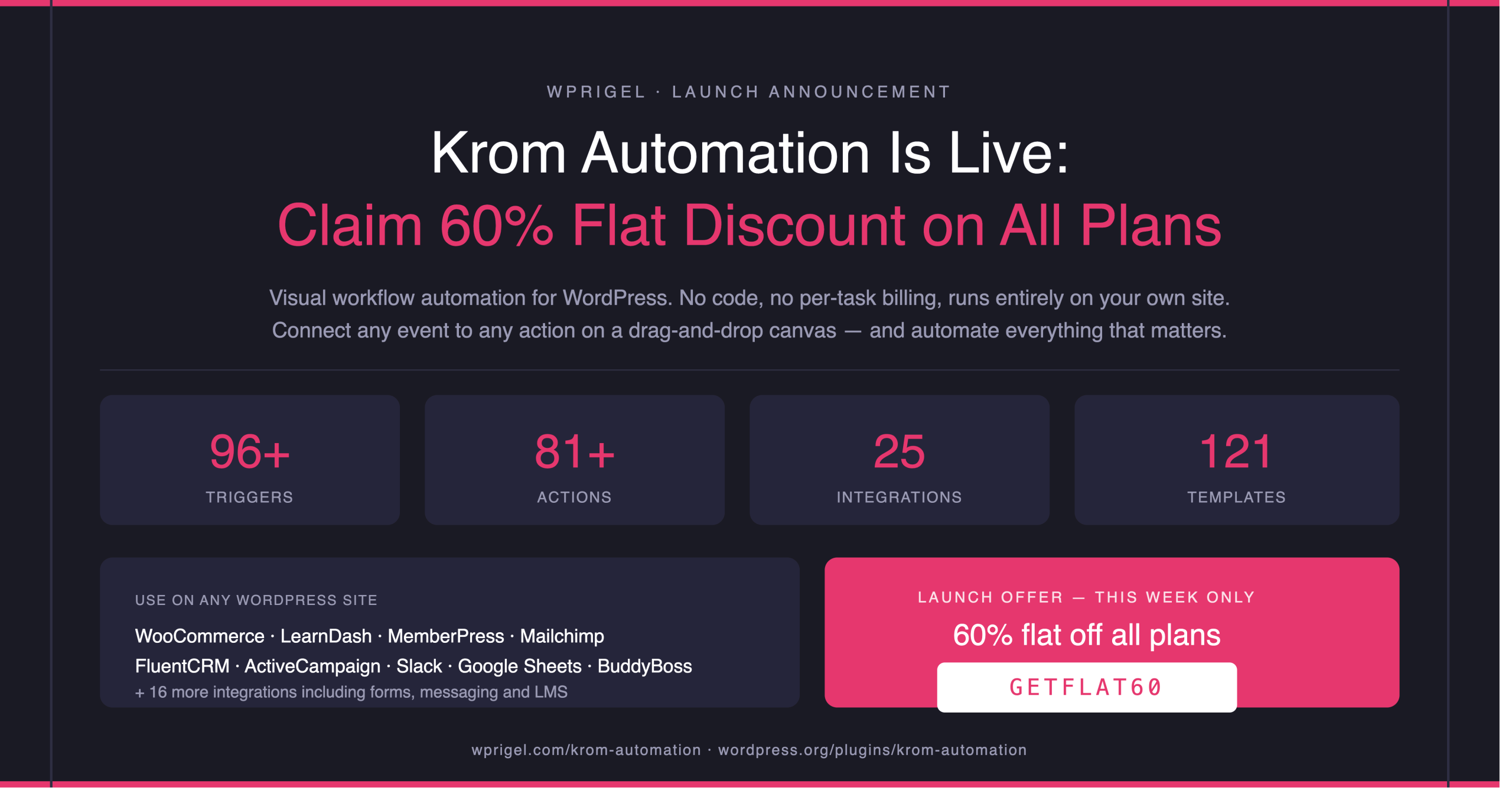
The lifetime plan at $119 — or $48 right now with the GETFLAT60 launch discount is a decision you make once and stop thinking about. See all plans here.
Launch offer: Flat 60% off all plans, yearly and lifetime. Code GETFLAT60 at checkout. Available this week only.
What I Would Have Done Differently- The Honest Gaps
A review that does not name the weak spots is not a review. It is a press release.
It is brand new
Krom Automation launched last week. There is no three-year production track record, no 50,000 active installs. If you are running mission-critical automation on a high-traffic site, I would run it in parallel with your existing setup for a month before you replace anything. Not because I expect problems — the architecture is solid — but because a plugin this new has not been stress-tested against every possible hosting environment and plugin combination in the wild.
The social posting is thin
Facebook, Twitter/X and LinkedIn actions are there, but if social automation is a significant part of your workflow, a dedicated tool does it better. Krom is strongest at the WordPress-native layer: users, orders, forms, LMS, membership.
Conditions take one workflow to click
The branching logic is well built but if you have never worked with automation conditions before, the first time you set up a yes/no branch you will need to think through it. Not steep, but not instant either. The simulator helps enormously here- you can test your condition logic before it touches anyone.
25 integrations is comprehensive but not exhaustive
HubSpot, Salesforce, and Shopify are not in the current integration set. If your stack runs heavily on either of those, keep that in mind.
Who Should Actually Use This?
Let me be direct about the fit.
This is clearly for you if:
- You run WooCommerce, LearnDash, MemberPress or BuddyBoss and you are currently doing follow-up manually or paying Zapier to do it
- You are an agency deploying the same WordPress stack across client sites and you want to export and import workflows rather than rebuild them every time
- You want automation that stays on your server, not someone else’s
- You have been put off automation tools before because of per-task billing or complexity at scale
Probably not the right moment if:
- You need a tool with a long production track record at scale before you consider it for business-critical work
- Your automation needs are primarily outside WordPress- Shopify, Salesforce, non-WordPress SaaS products
The sweet spot buyer is exactly what Tuhin and Ishraq built it for: a WordPress-first business operator who knows what they want to automate, does not want to pay per task to do it, and wants the whole thing to live on their own install.
Final Take on Krom Automation
Tuhin and Ishraq built something that solves a real problem in the right way.
It stays inside WordPress. It prices like a plugin rather than a subscription service. The visual builder is good enough to use without reading the documentation first. The execution logs are more useful than anything Zapier shows you. The AI workflow generation genuinely lowers the barrier to starting. And the pricing at launch — $48 a year with GETFLAT60 — makes the decision straightforward for anyone who has been paying Zapier monthly and quietly resenting it.
Is it perfect? No. It is a week-old plugin. Give it six months of production use and a few thousand active installs and some of the rough edges will smooth out. But the foundation is right, the positioning is right, and the pricing model is right.
I am recommending it to the people I know who run WordPress-first businesses. If that describes you, the timing right now (with the 60% launch discount running) is as good as it gets.
Get Krom Automation 60% Off This Week
Use code GETFLAT60 at checkout. Applies to yearly and lifetime plans.
Frequently Asked Questions
Is there a free version of Krom Automation?
Yes, and it is genuinely capable. The free version on WordPress.org includes 16 triggers, 21 actions, full WooCommerce support, AI actions, merge tags, conditional branching, delay scheduling, execution logs and 20 workflow templates. No account required. No time limit.
Do you need to know how to code to use it?
No. The entire workflow builder is visual — drag and drop, no PHP, no custom hooks. The only exception is if you want to register your own custom trigger or action via the developer API, which is entirely optional.
Is it safe to use on a production site right now?
I would use it on production today, with one caveat: since it launched last week, I would run new workflows through the simulator thoroughly before activating, and I would keep an eye on execution logs for the first few weeks. The architecture is solid (it uses Action Scheduler for background execution, the same queue system WooCommerce uses) but every new plugin benefits from a burn-in period.
What is the actual difference between Krom Automation and Uncanny Automator?
Three meaningful differences from a PMM perspective. First, the builder: Krom is a visual canvas, Uncanny is a list-based rule editor. Second, the pricing: Krom starts at $119 per year versus $199 for Uncanny’s entry tier. Third, the features: Krom includes a lifetime plan, step-level execution logs, an AI workflow generator and an incoming webhook receiver at entry level — none of which Uncanny offers at their basic tier.
Where can I read the full documentation before deciding?
All of it is at wprigel.com/docs/krom-automation. The setup guides, integration references, and trigger and action documentation are all there.
Krom Automation is made by the wpRigel team. I know Tuhin and Ishraq personally. This review is my independent assessment after testing the product.
Leave a Reply